
Getting started
Apple Journal for Android? What to use instead
There is no Apple Journal for Android. Which Android journal app fits how you used it, with dated, sourced facts and what to export before you switch.
In this guide
- Is there an Apple Journal app for Android?
- What is the closest Android equivalent to Apple Journal?
- How do the Android options compare?
- Can you use Apple Journal in a browser or on a Chromebook?
- What should you do with your Apple Journal before switching to Android?
- When is Dearly the right pick?
- What does Dearly not do that Apple Journal does?
- When should you choose one of the others instead?
We make Dearly, one of the apps on this page. Every fact about another app below comes from that app’s own page or store listing, with the date we checked it. Where another app is the better fit, we say so.
Is there an Apple Journal app for Android?
No. Apple Journal runs only on Apple devices: iPhone and iPad (iOS and iPadOS 17.2 or later) and the Mac (macOS Tahoe 26). There is no Android version and no web version. Apple has not released Journal for Android, so an “Apple Journal APK” is not Apple’s app. To journal on Android, you need a different app.
Sources: the App Store listing for Journal (checked 2026-10-19) and Apple’s newsroom post on iPadOS 26 (checked 2026-09-05).
What is the closest Android equivalent to Apple Journal?
It depends on what you used Apple Journal for. It does several jobs at once: photos and places, a quick typed line, voice notes, a mood check. No single Android app copies all of it, so pick the one that matches the job you did most.
| If you mostly used Apple Journal for… | Try this on Android | Why |
|---|---|---|
| Photos, places and a few lines about the day | Day One | Rich entries with photos and video, on Android, iPhone, Mac, Windows and the web |
| Typed entries you want on every screen, Chromebook included | Journey | Android, iOS, Mac, Windows, web and Chrome OS, with end-to-end encryption on its own cloud sync |
| Typing, with guided programmes to follow | Reflection | Typing-first, with guided programmes and voice input |
| Speaking instead of typing | Dearly | Tap, talk, and the entry is written for you |
| Journaling on an iPad or Mac you still have | Keep Apple Journal there | It is free and end-to-end encrypted in iCloud. Your phone just won’t have it |
How do the Android options compare?
All four apps below run on Android. They differ most on voice, encryption and price. The last row gives each app’s source and the date we checked it. Prices are in US dollars and can change, so check the app’s own page before you pay. Reflection here means the app at reflection.app, not the older Reflectly.
| Apple Journal | Day One | Journey | Reflection | Dearly | |
|---|---|---|---|---|---|
| On Android | No | Yes | Yes | Yes | Yes |
| Also on | iPhone, iPad, Mac | iPhone, Mac, Windows, web | iOS, Mac, Windows, web, Chrome OS | iPhone, iPad, Mac, web | iPhone |
| Voice | Audio attached to an entry; transcription in English only | Records audio on Android (paid plans); transcription is iPhone only | Audio files in entries; no transcription described | Typing-first, with voice input | Speak and the entry is written; 10 transcriptions a day free |
| End-to-end encrypted | Yes, in iCloud | Yes for new journals (stated for iOS and Mac) | Yes, with Journey Cloud Sync | No | No (see the limits below) |
| Free plan | Free | Yes, without audio recording | Not stated on its page | Yes, unlimited entries | Yes: unlimited recording, 10 transcriptions a day, biometric lock |
| Paid | Free | $49.99/yr (audio, sync) or $74.99/yr | $6.99/mo or $49.99/yr | $8/mo or $69/yr | $9.99/yr, $1.99/mo, or $29.99 once |
| Source, checked | apps.apple.com, support.apple.com (2026-10-19, 2026-09-05) | dayoneapp.com (2026-09-05) | journey.cloud and its App Store listing (2026-10-19) | reflection.app (2026-09-05) | dearlyjournal.com (2026-10-19) |
Can you use Apple Journal in a browser or on a Chromebook?
No. Apple Journal has no web version, so there is no way to open it from Chrome, a Chromebook or a Windows PC. Its entries sync through iCloud only between Apple devices. If you need your journal on a Chromebook, Journey and Day One both have web apps, and Journey lists Chrome OS directly.
What should you do with your Apple Journal before switching to Android?
Export it while you still have the iPhone. Apple Journal can save every entry, with its media, as one ZIP file, and can save single entries as PDFs (Apple Support, checked 2026-09-05). Once the iPhone is gone, so is the easy way to get them out.
- On the iPhone, open Journal and export all entries as a ZIP. Apple’s support page “Export your Journal entries” has the current steps.
- Copy the ZIP somewhere that is not the iPhone: Google Drive, a computer, or a USB stick.
- Open the ZIP once and check that your photos and recordings are inside, not only the text.
- Save the few entries you care most about as PDFs too. A PDF opens anywhere.
- Then start the new app on Android. You don’t need to bring the old entries in: keep the export as your archive and begin from today.
When is Dearly the right pick?
When you’d rather say your entry than type it. You tap, speak for a minute, and Dearly writes it out as a dated page. Recording is unlimited on the free plan, and up to 10 entries a day are transcribed. Your recordings stay on your phone: the audio is sent over an encrypted connection only to be transcribed, and is never stored.
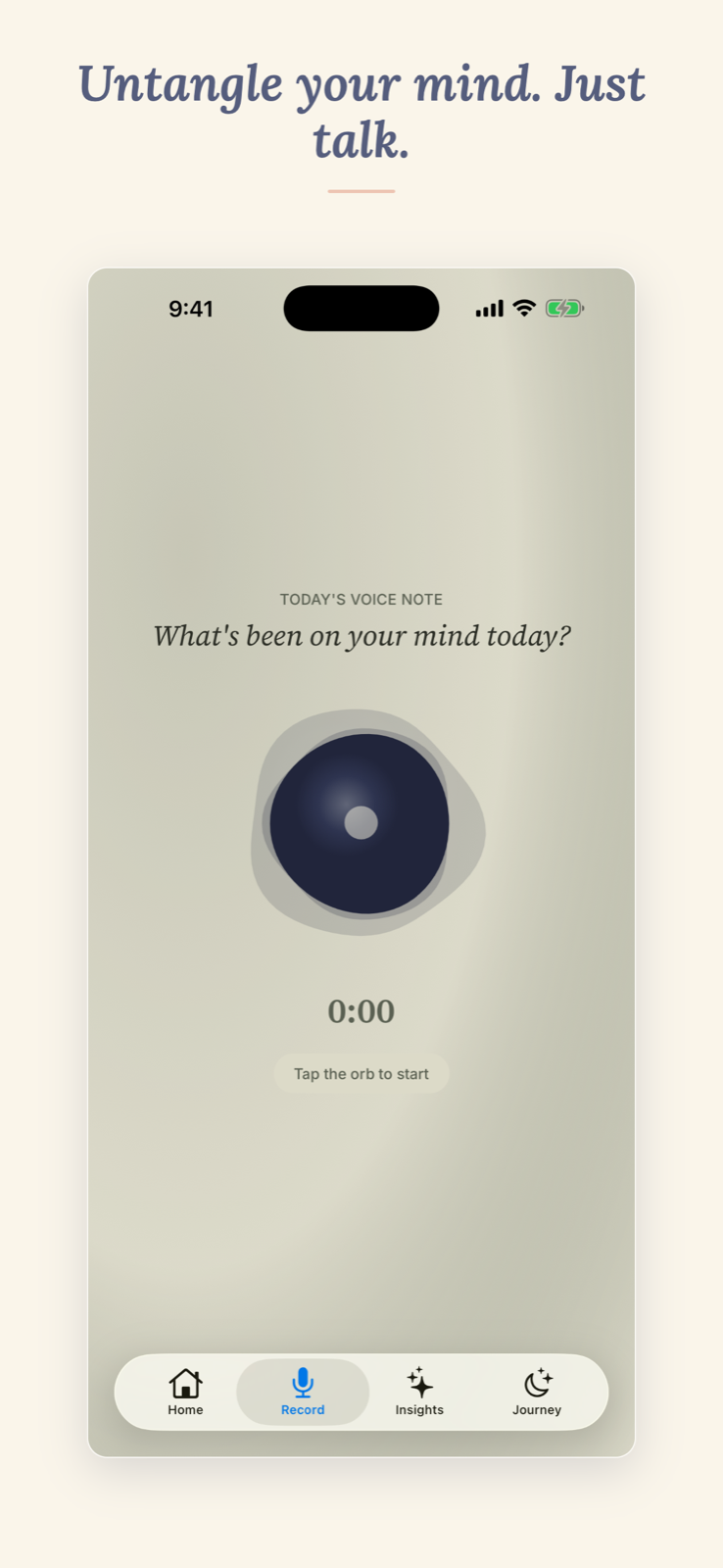
That is the part Apple Journal does least well for a talker: in Apple Journal, a recording is an attachment, and its transcription is English only. Day One on Android records but does not transcribe.
Dearly is on Android and iPhone with one account, so if you are leaving an iPhone, or carry one for work, the same journal is on both.
With Dearly Pro ($9.99 a year, $1.99 a month, or $29.99 once; free for your first 15 days), each entry also gets a short summary of the mood under it, and over weeks you see the people and topics that keep coming up.
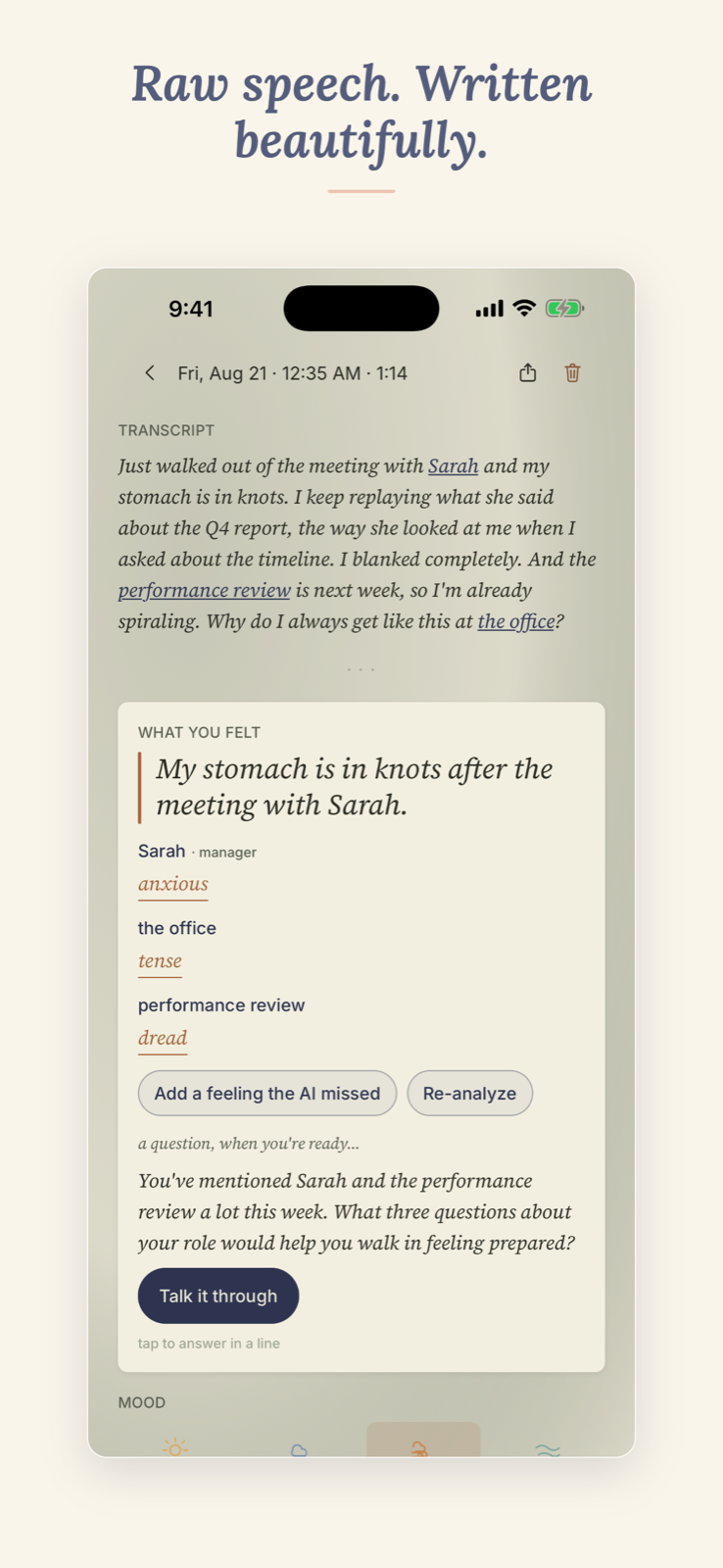
Both screenshots were taken on iPhone. For more on speaking versus writing, see voice journal vs written journal.
What does Dearly not do that Apple Journal does?
Quite a lot, and it is better to know before you switch. Dearly is built around speaking, so it is not a photos-and-places journal, and it has no link to Apple Health, the way Apple Journal logs State of Mind.
- Not end-to-end encrypted. Your recordings stay on your phone, but the written journal is stored in Google Cloud Firestore so it can sync between your devices. Apple Journal is end-to-end encrypted in iCloud. More in a private voice journal.
- Transcription needs a connection. You can record offline; the entry is written once you are back online.
- No Mac, Windows or web app. Android and iPhone only.
- Export is a Pro feature. Deleting everything is free and works from inside the app.
- Your Apple Journal entries stay in your export. Keep it as the archive and start fresh in Dearly.
When should you choose one of the others instead?
Pick another app when you mostly type, rely on photos, or need a browser or end-to-end encryption. Pick Dearly only if you’d rather talk.
- Day One if your Apple Journal was mostly photos with a few lines, and you want the same journal on Android, a Windows PC and the web.
- Journey if a Chromebook or a browser is where you write, and end-to-end encryption matters to you.
- Reflection if you like typing and want guided programmes and a coach.
- Keep Apple Journal on your iPad or Mac if you still have one and mostly journal there.
If you want more voice options on Android, our comparison of voice journaling apps for Android covers AudioPen, Voicenotes and Google Recorder too. Or start on the Dearly home page.